Should your next laptop be a Googlebook?
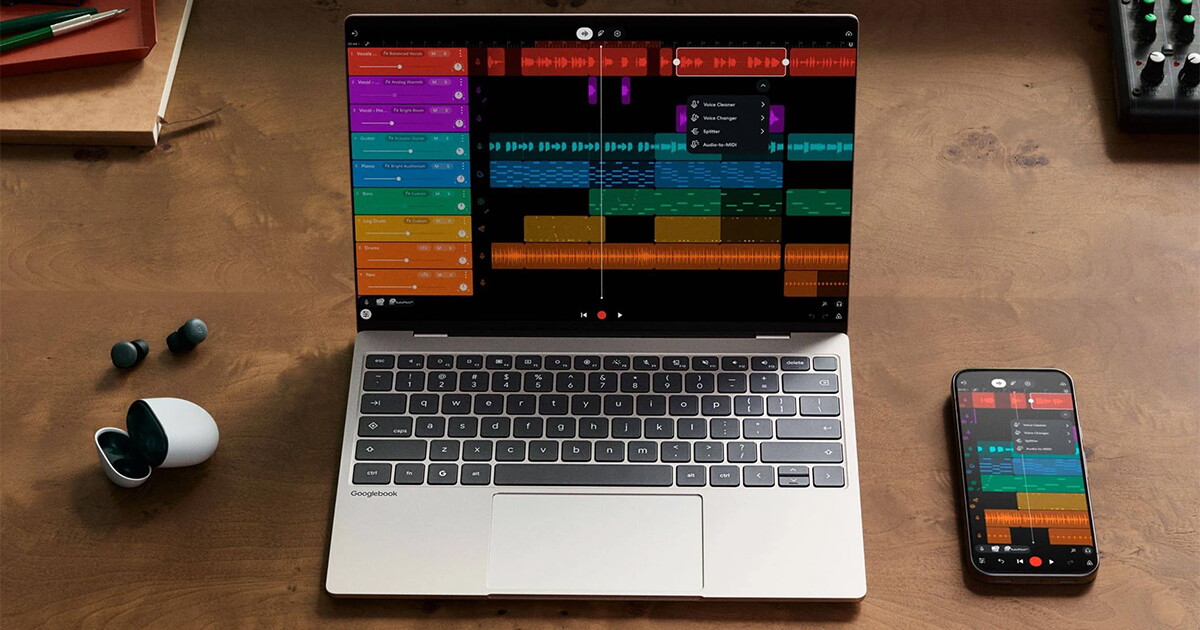
After first revealing the concept in May, Google has just introduced a line of Googlebooks: premium laptops designed to pair seamlessly with your Android phone and make it easy to access the company’s AI-powered services while you work and browse the web.
There are five models you can choose from right away, with more coming later. But are any of these worth considering as your next laptop? Let’s review what’s on offer and whether it will make sense for you. Spoiler alert: For most people, there are better options.
I’ve heard about Chromebooks. What is a Googlebook?
Unlike Chromebooks, which are typically built cheaply and run ChromeOS, Google’s browser, Googlebooks run an Android-based operating system that the company calls Googlebook OS. It focuses on Google’s Gemini AI, is compatible with all Android apps, and works especially well with Android phones.
Get to know Googlebook
There are some interesting features here. Move your mouse cursor and you’ll instantly summon Gemini so you can chat with him or ask him about anything on your screen. Start working on an app on your phone (like creating a vacation itinerary) and continue with the same app on your Googlebook without having to install it first. Browse all your phone files, such as screenshots and downloads, on your laptop like anything else on your local hard drive.
Can I run my favorite apps on this thing?
If your favorite applications are based on Android, yes. You can download and run anything from the Play Store and also instantly interact with the apps installed on your phone by streaming them to your laptop.
What it can’t do, of course, is run apps built for Windows or MacOS.
The interface will look familiar to people who have used a Chromebook before. Chrome OS already supported Android apps; This range takes things up a notch with more capable hardware and with the different ways you can transfer your running apps and files from your phone wirelessly.
Does AI functionality justify an entirely new device?
Googlebooks come with a 12-month subscription to Google AI Pro, so you get its fastest, most powerful AI models for questions, work, and generating images and videos. That includes 5TB of cloud storage.
If you’re all about AI, you’ll probably enjoy being able to access it quickly across your apps using the aforementioned Magic Pointer feature, dictating messages and having the Rambler feature automatically clean it up, and seeing suggestions for actions like adding a calendar event based on the contents of your screen.
So it all comes down to whether you use AI a lot in your daily computing and whether you’re happy with Gemini for all that. Windows and Mac devices can do many of these things too, with Copilot and Siri respectively, but Google could outdo them on these specific integrations that allow for quick access.
What about the hardware?
Google’s first batch of books comes from third-party brands. They’re all made of metal, they all come with a minimum of 512GB of storage, 16GB of RAM and high-resolution touchscreens, and they promise double-digit hours of battery life.
These machines feature efficient and high-performance current generation processors from Intel and Qualcomm’s Snapdragon series. Prices start at $899 for Acer’s Googlebook 14 and go up to $1,299 for similarly named models from Asus and HP.
They all look stylish, feature a nifty light bar on the lid that can show charging status, and will receive feature updates for 10 years.
If you get one, you can reasonably expect to enjoy a well-built device that looks and feels good for daily use and should run most Android apps and games without issue. That includes everything from video editing tools, productivity apps, and the GeForce Now service for streaming graphics-intensive games made for PCs.
So who should buy one?
It may be too early to give a clear verdict on the matter. Google just announced these laptops and journalists, including me, haven’t had time to review them in depth.
That said, based solely on specs and first impressions, I think these Googlebooks will appeal primarily to hardcore Android fans, the kind who like high-end phones for photography or expensive foldable models that can be nice to watch videos on.
You’ll notice that inexpensive Googlebooks aren’t offered yet. That’s another factor that pushes them into the gadget enthusiast category. Sure, you’ll get a metal laptop with decent-specced internals, but you could probably get this kind of performance (and similar functionality) for less if you opt for a Windows or MacOS laptop.
If you’re looking for a laptop right now, this range is a bit difficult to recommend at the moment. This is because we haven’t spent much time on them yet and there are many attractive alternatives.
I’m talking about the $699 MacBook Neo, which offers a great bang for the buck in terms of performance and battery life. For most people who don’t specifically need high-end hardware, that’s what they should compare to everything else.
On the Windows side, you have the current-gen Dell XPS 13 for $800 and the cheaper Asus Vivobook 14, among others. Both promise solid battery life and snappy performance for everyday tasks.
I’ve been using Android phones for years, so I’ll gladly try a Googlebook and hope I like it. However, they can’t run better software than what’s available on Android right now, and that seems limiting.
When it’s time to do serious photo editing, color video editing, and recording guitar compositions, I turn to powerful, flexible, and familiar software for these workflows on Windows and MacOS. Sure, there are options and popular app versions for these on Android, but they don’t stack up as well right now.
In short, Googlebooks are worth checking out if:
- You really like Android and want that connected ecosystem experience where your devices work well with each other.
- Expect to use AI more than you already do
Check out the range of Google Books on the Google site. They are available through the company store and some are also at Best Buy. Orders will begin shipping next month.
Source: Google



Post Comment