Slim magnetic controllers turn your phone into a gaming handheld
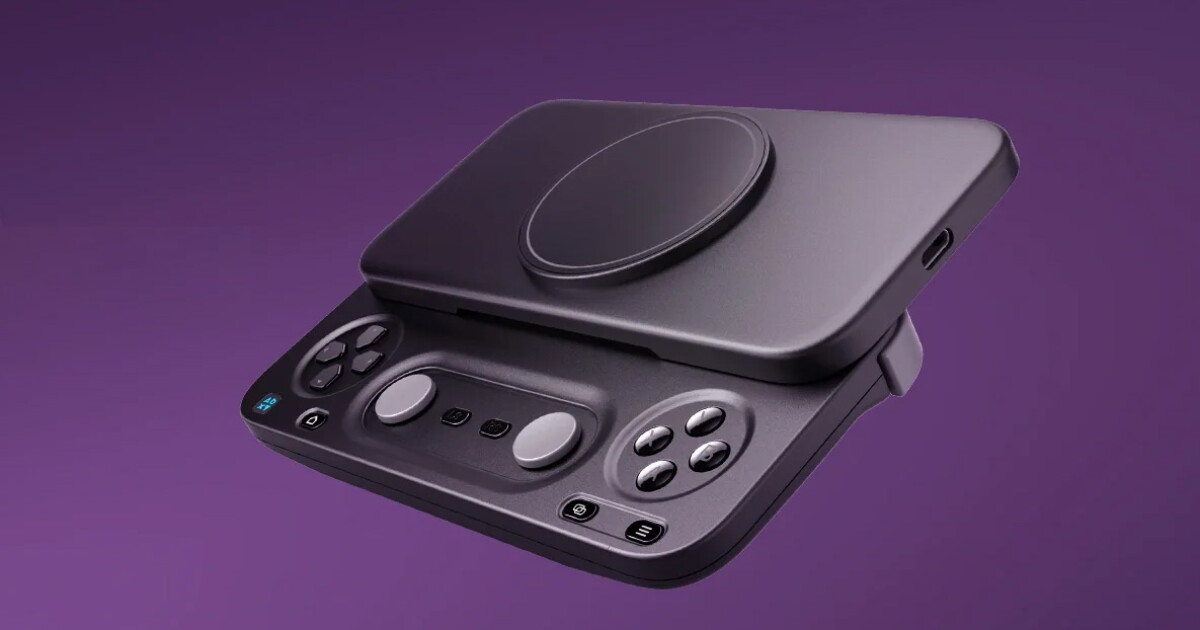
Gaming hardware brand Abxylute has created two products to enhance your mobile gaming sessions wherever you find time to play. Their new M5 and M6 controllers are designed to offer appropriately sized buttons and joysticks, while connecting securely to your phone and fitting in your pocket.
This is unlike most mobile controllers today, which have a full-size gamepad that inelegantly clips onto your phone or stretches out in the middle to fit your phone between two halves of a controller. I have one of the latter from GameSir and enjoy using it, but it’s big enough to make me think twice about packing it for a trip.
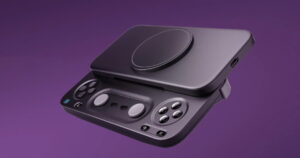
However, Abxylute’s M5 and M6 are basically thin, flat slabs that are much easier to transport. Both slide to double their width and reveal a spacious control deck complete with all the buttons you’d expect, a D-pad, joysticks, and more. Meanwhile, the top half attaches magnetically to your phone.
Official film M5 and M6 | Launching October 6 on Kickstarter
The two models are similar in many ways, but differ in their construction and how they connect to your phone. The slimmer M5 uses a USB-C connection for lag-free input, while the battery-powered M6 uses Bluetooth and offers larger joysticks.
What do the M5 and M6 have in common?
Both models promise rock-solid magnetic attachment and allow you to adjust the position of the magnetic mount on the back panel. This means it should comfortably accommodate phones of all sizes, regardless of the camera bump. I imagine this could also fit foldable phones like the Moto Razr and Samsung Galaxy Flip, which only have the bottom half of the body available to attach. For phones without MagSafe, the case includes a magnetic adhesive ring.
Abxilute
Like high-quality controllers, these feature dual z-axis linear motors to provide vibration feedback in games. You can adjust the intensity in four levels.
The M5 and M6 include a physical switch to toggle between NS, XInput, and PS input modes, so they will work across all platforms, game types, and emulators.
Abxilute
Both controller bodies have a rounded rectangular shape. For a little more money, you can get a detachable magnetic grip that snaps into the bottom and extends into the palm of your hand for better ergonomics and less fatigue during long gaming sessions.
Abxilute
A companion app lets you configure your controller, remap buttons, and adjust joystick vibrations and sensitivity. It also has a game library to quickly find a title to access.
Honestly, it seems a little difficult to choose between the two, not only because of the difference in connection type, but also because they offer different control experiences over how the D-pad feels.
The M5 with USB-C
The slim M5 features wired connectivity, which may seem like a hassle, but this eliminates lag and you also get pass-through charging to top up your phone while you play.
Abxilute
To achieve its slim profile, it comes with low-profile sliding joysticks. They are not clickable, so instead you have dedicated LS and RS buttons next to them. Note that the M5 uses a directional pad layout with separate buttons, similar to what you’ll see on a PS Vita.
You’ll also find microswitch triggers on the shoulders and a macro button that can be programmed for combos and quick actions. Everything comes in a 6 oz (170 g) package.
The wireless M6
If you simply need taller joysticks, this is the one to consider. The M6 has clickable capacitive bars mounted in a recessed section of the deck. Coupled with a traditional D-pad structure, as well as linear analog Hall-effect triggers that can switch to a rapid-fire mode for FPS and action titles, it offers a more tactile experience than the M5.
Abxilute
The M6 connects via Bluetooth 5.3 and you can expect 10 hours of playback on a full charge of the 500mAh battery. The cells make it slightly heavier than the M5 at 6.7 oz (191 g).
There is another interesting feature here. A 6-axis gyroscope allows for motion control, so you can physically tilt and rotate your M6 to navigate and aim in games. I’ve never been good at this, but it can be fun for more experienced players.
Abxylute is funding both models on Kickstarter, where you can pick up the M5 for $59 (versus an expected MSRP of $84.99); the M6 can be had for $65 (was $89.99).
All crowdfunding campaigns carry an element of risk, so you’ll want to keep that in mind if you decide to back this campaign. For what it’s worth, Abxylute already makes and sells a variety of controllers and accessories, and has been in the game for a while. It also offers the M4, a similar magnetic driver with a more compact square design.
Both models are significantly cheaper than the $149 OhSnap Mcon, which arguably started the magnetic driver trend.
If all goes to plan, orders are scheduled to ship worldwide later this year, with the M6 starting in November and the M5 starting in December. Delivery is a flat $10 per unit wherever you order.
Source: Kickstarter




Post Comment