ESPHome Starter Kit Review: DIY Smart Home Innovation
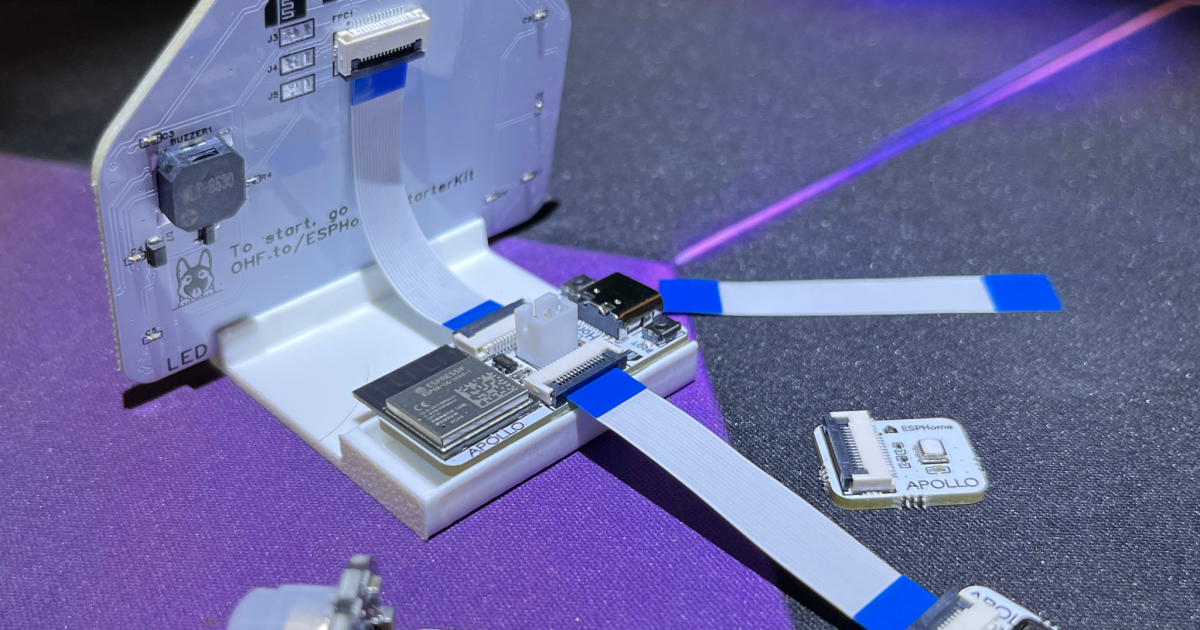
There’s something unusually exciting about opening the ESPHome starter kit. This is not just another ESP32 development board. It is the first official hardware product from ESPHome, which has quietly become one of the foundations of the DIY smart home. That seems significant.
ESPHome is the open source platform that allows small, inexpensive microcontrollers to become almost anything you want: temperature sensors, buttons, lights, displays, presence detectors, Bluetooth proxies, and thousands of other devices. It is particularly associated with Home Assistant, where an ESPHome device can become a native part of your smart home while remaining completely local.
The problem is that going from “that sounds brilliant” to your first homebrew device traditionally involved ESP32 boards, jumper cables, breadboards, pin diagrams, and at least some knowledge of YAML. None of this is particularly difficult, but taken together it can be perceived as a major obstacle.
The $40 ESPHome Starter Kit, designed and manufactured with Apollo Automation, is ESPHome’s answer to that problem.
This is not going to go in the junk drawer.
My first impression was simply how solid and finished it feels.
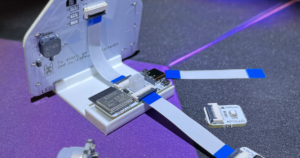
The kit arrives as a carefully fabricated PCB panel containing an ESP32-C6 controller and modules for a push button, temperature and humidity sensing, and a house-shaped “Little House” containing RGB LEDs and a doorbell. A separate PIR motion sensor is included, along with flat cables and a stand.
You remove the individual boards from the panel and connect them using the supplied cables. There’s no soldering and little opportunity to plug something into the completely wrong pin and wonder why nothing works.
More importantly, these are not components designed solely for an afternoon electronics lesson. The button looks like one you’ll actually use. The Casita looks good enough to sit on a desk and those super bright RGB LEDs really shine.
This is pretty unique to starter kits. I know this, I have a drawer full. It’s not a gadget designed to teach you a few concepts before disappearing into a closet. These are adequate and complete components, designed to last, continue doing things and, progressively, fill the mind with possibilities. I already have several ESPHome devices doing various jobs around the house, so this one won’t be back in the box either. Will join the collection.
Wobble-Free Training Wheels
The tutorial is particularly well judged. It uses a familiar wiki-style layout, with each step clearly separated and easy to follow. There is also an optional advanced path if you want to learn Lambda conditions and steps to link projects to Home Assistant if desired. You also don’t need to understand YAML, although interestingly you are still exposed to it.
As you add modules one by one, the configuration appears in modular blocks. Add the button and you will see your code. Add another component and another block will appear below it. You can follow the changes without needing to understand each line. Instead of facing a configuration wall, you watch it grow piece by piece.
Howard Armitage/New Atlas
The other thing I noticed was what No happen.
There were no problems connecting the board. Anyone who has used cheap ESP32 development boards will know that they can be surprisingly temperamental at times. Windows refused to cooperate completely, forcing me to pull out an old Linux laptop just to upgrade one. This Starter Kit immediately connected to my Windows desktop. The bellhops did what they should first time, and you’d be forgiven for wondering what all the fuss was about.
That’s really important. If this is someone’s introduction to ESPHome, the first ten minutes count. A beginner should not diagnose USB controllers before they have flashed an LED.
Now do something useful
The supplied tutorials cover many interesting combinations: motion detection, environmental monitoring, buttons and notifications. It gets really interesting when you stop following them.
You’re not even halfway through the tutorials before your brain starts coming up with ways to use this. You’re no longer reproducing someone else’s project, you’re looking around the house, spotting something useful, and realizing you already have the pieces to build it.
So I decided to be unreasonable.
Howard Armitage/New Atlas
To really put it to the test and prove it was real, I combined the kit with a camera module connected to Frigatemy local AI and Home Assistant, to control my dog. The ESP captures and transmits the video to Frigate, which handles visual detection, while Home Assistant collects the events. By looking at the dog door, I could count how many times it went out, with the results appearing on a Home Assistant dashboard throughout the day, and a delightful pulsating LED in the Casita giving me a gentle “the dog is out” notification in my office. Excessive? Absolutely. But that is my local ESP32 doing that!
And now, a beginner’s electronic kit has become a small part of a much larger local automation system.
That’s really what this kit teaches: not a few projects, but a way of thinking.
What makes ESPHome unusually powerful is the depth behind that beginner-friendly surface. It’s been developed and expanded by a large tinkering community, and the list of things you can add to an ESP32 is huge: displays, relays, microphones, speakers, Bluetooth proxies, web servers, environmental sensors, addressable LEDs, motors, NFC readers, and much more, including quite a gorgeous pixel clock That has helped me see Alexa’s backside. New Atlas reviewed the code point which started as an ESP32 project before becoming a commercial product, proving that you can really go from beginner to finished product with this same device.
There are ready-to-use components for a wide range of hardware, and when there isn’t one, the platform is open enough that people routinely build their own. The Starter Kit may start with a button, an LED, and a temperature sensor, but it’s actually an introduction to an ecosystem. That’s the smart part. The training wheels come off remarkably quickly, for kids big and small. I’m pretty sure you could get to Mars with a pair of these.
Okay, I’m leaving. I need to print a case for my new dog camera.







Post Comment